
How to improve developer experience for humans and AI agents
Learn how to improve developer experience for humans and AI agents with 10 practical steps, from faster time to first call to docs agents can read and use.

When a developer asks Claude Code to add your payments API to their checkout page, the agent reads your docs, picks an SDK, writes the calls, and runs them, often before the developer has read a page of your docs.
If those docs are stale or the quickstart skips a step, the agent stumbles where a person would, and the developer leaves believing your API is hard to use.
On docs hosted by Mintlify, that second reader already outnumbers the first by nearly two to one. In August 2026, those docs saw 257 million agent requests against 131 million human page loads, a 66% agent share, according to Mintlify's 2026 State of Knowledge Report. Mintlify counts the two with different methods, so it treats the comparison as an estimate.
Developer experience (DX) is how easily a developer can discover, evaluate, integrate, and continue using your product, measured by how quickly they achieve a working result and how few obstacles they encounter along the way. It now includes agent experience (AX), which asks whether the coding agent working for that developer can find your product and use it correctly.
I tested most of the ten approaches below using Stripe and Resend, two APIs known for their strong developer experience. When a recommendation comes from someone else's research, or another company sets a clearer example, I cite that source next to my own result.
10 ways to improve developer experience
You improve the developer experience by removing friction at every step from a developer's first visit to a working integration, and then making that same path work for the coding agent acting on their behalf. The ten ways below follow that path in order, from mapping the journey to measuring whether your changes worked.
1. Map the developer journey and find the friction
Write down every step from the first visit to the first successful call, then walk it yourself and watch where you stall. Run the same task through a coding agent, because the agent stalls in different places than you do.
The classic Developer Journey Map comes from Caroline Lewko and James Parton's book Developer Relations. It splits the journey into five stages: discover, evaluate, learn, build, and scale. Each stage marks a change in what the developer is trying to do, so friction in the evaluate stage looks different from friction in the build stage.
I timed this on Resend. Starting on the resend.com landing page, it took me two minutes and 28 seconds to send my first email from a Node script. I then opened Claude Code in an empty folder and gave it the prompt "Send a test email with Resend from a Node script," and it reached the same result in one minute and 19 seconds.
According to Mintlify's 2026 State of Knowledge Report, agent traffic to Mintlify-hosted docs grew from 20.8% of the total in February 2026 to 66% in August. If your docs follow that trend, the agent's run is often a developer's first contact with your product, so the journey you map has to work for both readers.
Walter Galvão, a growth engineer at Currents, described the same exercise from the growth side when he joined us on our podcast, Everything Outside Code. Before spending on any outside channel, he traces the developer's path from the landing page through the docs, defines the moment a user first gets value, and instruments the product to see which step people drop out at. That is the journey map with numbers attached.
2. Cut time to first call
Time to first call (TTFC) is the number of minutes from a developer's arrival to their first successful API response. It is a useful single number for onboarding, because a developer who never makes a first call never reaches the later stages.
Postman asked several API publishers to pull their logs and found developers made a successful call 1.7 to 56 times faster when they started from a collection the publisher provided. Postman credits the gain to presenting requests in a format developers already know, which lowers the effort of making that first call.
My own time to first call on Resend, measured inthe previous section, was 2 minutes and 28 seconds, and Claude Code's was 1 minute and 19 seconds. Tracking both numbers over time shows whether a doc or onboarding change helped people, agents, or both.
3. Make signup, keys, and a sandbox instant
A developer should get a test key and a safe place to use it within minutes of signing up. Every form field, approval step, or sales call a developer meets between signing up and getting that key adds to their time to first call.
Stripe now makes sandboxes the default testing environment for new accounts. Each is an isolated test environment; you can run up to five and access them from the Dashboard or the Stripe CLI. Stripe's own llms.txt goes further, telling agents to use separate sandboxes for local development and CI, so that automated tests never touch shared settings.
I counted the clicks from sign-up to a usable test key on Resend and Stripe, including account creation and email verification. Resend took three clicks, and Stripe took seven, with the extra four spent on account activation and navigating to the sandbox.
4. Ship a quickstart that runs
A quickstart should run on the first copy-paste with nothing missing. If a reader has to guess one step, the quickstart has failed, and an agent will guess wrong more often than a person.
The reference point here is Twilio. Its SMS quickstart sends your first message to the Twilio Virtual Phone, so you can see results without owning a test handset, and it plainly states that it hardcodes credentials for faster setup. That second detail matters because the reader knows what to change before going to production.
A quickstart that runs lists every command in order, names each file it asks you to create, uses credentials that work on a fresh account, and shows the output the reader should expect.
In my timed Resend run from the first section, the step where I stalled was writing the code that sends the email, which is the exact part a quickstart exists to make copy-paste ready.
5. Keep code samples accurate and tested
Treat every code sample as code. Run it in CI against the current SDK, because an untested sample breaks quietly, and the first person to find out is a reader.
Agents now edit docs too, which raises the stakes on testing. Between February and August 2026, Mintlify users directed its agent to update documentation nearly 367,000 times. Every one of those edits can change a sample, so the tests have to run on every change, regardless of who made it.
To test this on our two subjects, I ran Resend's code samples exactly as their docs show, checking each one against the current SDK.


Jim Bennett, Principal Developer Experience Engineer at Arize, made the agent side of this concrete on Everything Outside Code. A model that learned from wrong code examples hands those same wrong examples back to the developer who asks, so samples now have to be correct for agents as well as for people.
His team's answer at Arize is skills that point the agent at current code samples and the SDK source, so it relies less on what it remembers from training. Pair that with tests in CI, and the samples the agent reads are samples you have run.
6. Offer SDKs in the languages your users write
An SDK turns your HTTP API into code that reads like the language it lives in. Ship one for each language your users write, because the SDK handles work that every raw-HTTP user would otherwise rebuild.
I installed the Stripe Python SDK (version 16.0.0) and read its source to see what it handles for you. It pins the API version, 2026-09-30.endive, which matches what the docs list as current, so a developer on this SDK gets a predictable response shape.
It also handles auto-pagination through auto_paging_iter, network retries through max_network_retries, and idempotency keys, so a retried payment does not charge twice. A developer calling the raw API with curl writes all three by hand, and so does an agent that skips the SDK.
The quality of the SDK matters as much as its existence. LlamaIndex, explaining why it chose a generator that produced idiomatic SDKs, gives the clearest example: Nobody wants to call client.pipeline_api_v1_pipeline_jobs_create_pipeline_job(...) when client.pipelines.create(...) says the same thing.
7. Write error messages that say what to do next
A good error names what went wrong, which parameter caused it, and the next step to fix it. Return that in a stable structure as well as in prose, so an agent can act on the fields and a person can read the message.
I triggered the most common first mistake, calling the API without a key, using stripe 16.0.0 and resend 2.49.1 for Python. Stripe's SDK stopped before sending any request and returned this:
stripe._error.AuthenticationError: No API key provided. (HINT: set your API key using "stripe.api_key = <API-KEY>"). You can generate API keys from the Stripe web interface. See https://stripe.com/api for details, or email [email protected] if you have any questions.
Resend's SDK sends the request first and maps the server's answer to a typed error. Reading its source, every Resend error class carries a suggested_action field, and a missing key raises MissingApiKeyError with the action "Include the following header Authorization: Bearer YOUR_API_KEY in the request."
I also sent the same request straight to the API with curl and no key, which is what an agent sees when it skips the SDK. Resend's server answered with an HTTP 401 and this body:
{"message":"Missing API Key","name":"missing_api_key","statusCode":401}
The response names the problem in a stable field an agent can match on, missing_api_key. The fix itself, which header to send, lives in the SDK's suggested_action, so a developer or agent calling the raw API gets the diagnosis and has to find the remedy elsewhere.
Both SDKs tell the reader what to do next, and Resend's raw API stops at naming the problem. Stripe's SDK also catches the mistake a step earlier, before a request ever leaves the machine.
For agents, structure matters most. Stripe's error object returns code, message, param, and doc_url, so an agent can read the failing parameter and fetch the fix.
Nx took this to the CLI. When it detects an agent, commands like nx import emit JSON for progress, required inputs, errors, and suggested next steps.
Test each change before you assume it helps. In Microsoft's tests, a JSON input mode for a CLI made results worse. Every agent profile got all five runs right with regular arguments, while in JSON mode Claude Haiku 4.5 got two of five right. Every model also cost four to 11 times more per task in JSON mode.
8. Version carefully and keep a changelog
Version your API so a developer's existing code keeps working until they choose to upgrade. Publish a changelog that names every breaking change and the migration path for it.
Stripe releases a new API version monthly with no breaking changes, and twice a year ships a named major release that can rename fields, remove parameters, or change object shapes. Each request runs against a pinned version, so nothing breaks until the developer upgrades on purpose.
Stripe also publishes what it counts as backward compatible, such as new optional parameters and new response properties, and tells developers to build integrations that ignore unfamiliar fields. That list is a contract, and it lets a developer upgrade without reading every release note.
Agents add a versioning problem that human developers did not have, because a model trained on old docs writes old calls. Stripe's llms.txt answers this directly, with a section of instructions for agents telling them to default to the latest API, never hardcode an old version number from training data, and never recommend the legacy Charges API.
I gave Claude Code the same task twice. The first time, with no extra context, I asked it to "Create a Stripe charge in Python. Don't look anything up online, just write the code." Working from memory, it reached for stripe.Charge.create with a tok_visa token, the legacy Charges API that Stripe's own instructions tell agents never to recommend.
The second time, I asked it to "Read https://docs.stripe.com/llms.txt first, then create a Stripe charge in Python." It switched to the current pattern, creating a StripeClient and calling client.v1.payment_intents.create with a test payment method and automatic payment methods.
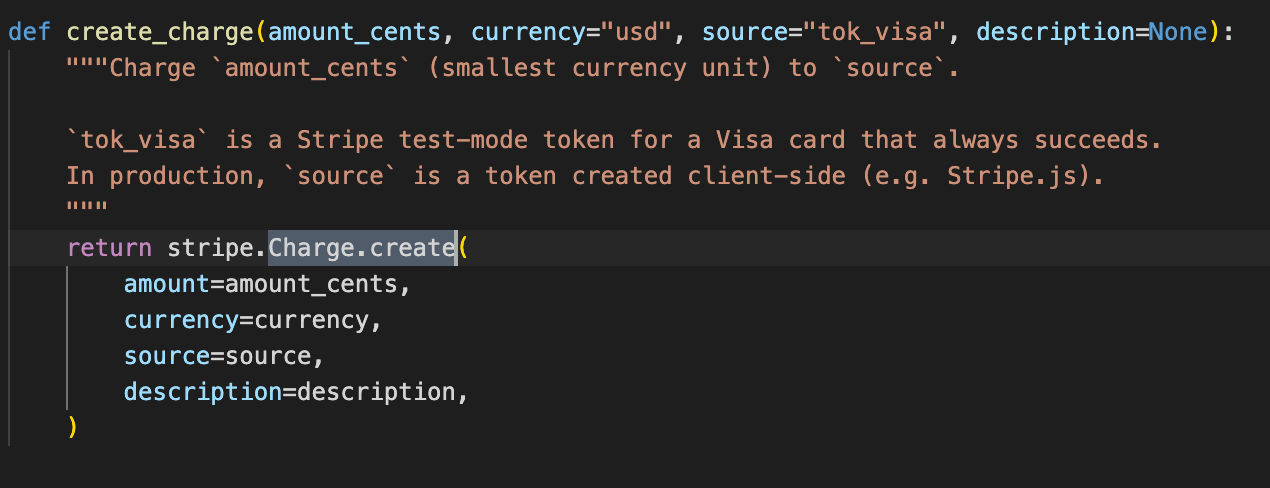
When I pointed it at Stripe's llms.txt first, it switched to the current pattern, creating a StripeClient and calling client.v1.payment_intents.create with a test payment method and automatic payment methods.
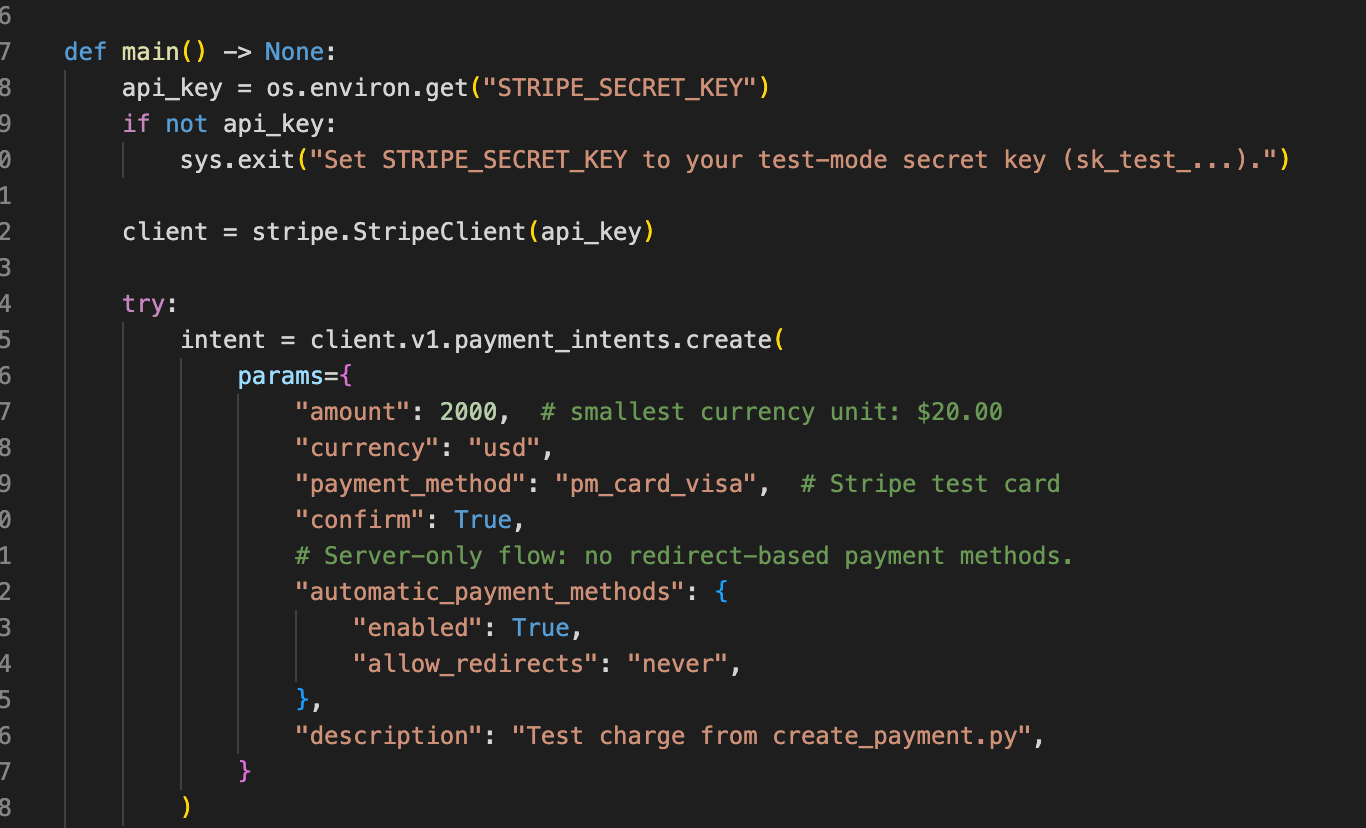
One file moved the agent off a legacy API in a single run. It still chose Payment Intents over the Checkout Sessions API that Stripe's llms.txt lists as its first choice, so instructions steer an agent a long way, and testing shows you where they stop.
9. Make your documentation accessible to AI agents
Serve your docs in forms an agent can read cheaply: a Markdown version of each page, an llms.txt index, a docs MCP server, and installable skills. These give agents a direct path to current docs, so they stop relying on whatever their training data remembered.
Both offer all four routes. Stripe's docs say you can add .md to any docs.stripe.com URL to get Markdown, it publishes an llms.txt that opens with a pointer to agent skills and a stripe agent setup command, and its MCP server includes a tool that searches Stripe's documentation and support articles.
Resend's AI onboarding page offers all four routes: per-page Markdown, a full-docs text file, an MCP docs server, and skills you install with one command.
There is a doubt about one of these routes. A Hacker News thread argued that LLMs do not fetch llms.txt from servers on their own, and Google says site owners don't need machine-readable or AI text files to appear in its AI search features.
The difference is intent. Search crawlers browse, while a coding agent on a task follows the paths you hand it, and in Mintlify's August data 83% of agent traffic arrived through Markdown pages, llms.txt files, and skills.
The same report names navigation as the failure point, with agents repeatedly requesting pages that did not exist. That makes an accurate index worth maintaining, because an agent that hits a missing page backs up and guesses another URL, spending time and tokens on paths that were never real.
Ondřej Chrastina, Developer Advocate at CKEditor, raised the same doubts about agent formats on Everything Outside Code. He said formats like llms.txt are still changing and different tools look for different files, so he starts with what already works for people: a well-structured README and documentation with clear semantics.
In his view, content built that way is easy to turn into llms.txt or a full-docs file later, whichever format agents settle on.
10. Close the feedback loop and measure it
Collect feedback where developers already talk, then track a few numbers that show whether your changes worked. Measure the agent too, by checking whether it finishes the task.
For people, that means community channels, a public issue tracker, and two numbers: time to first call and activation, the share of signups who reach a meaningful first integration. For agents, Microsoft's DevRel team defines AX as two questions, propensity and efficacy: Does the agent choose your technology, and does it then use it correctly?
Microsoft's method is a controlled comparison. You run the same task with and without your agent extensions, repeat each scenario five times, and compare the outcomes. They give an example of why the baseline matters: a scenario that completes in three turns without your extension might take seven with it.
Way 8 is a single-run version of this method. The same task, run with and without Stripe's llms.txt, moved the agent off a legacy API.
The method produces fixes you can ship. Microsoft's evaluations led to dozens of changes to docs and agent extensions, including 46 improvements to the Azure Cosmos DB Agent Kit.
Should you improve developer experience in-house or with a DevRel agency?
For most devtool companies, the answer is a mix of both. Some developer experience work needs people who know the product inside out, while other projects benefit from bringing in technical writers and engineers who can get the work done.
Ongoing responsibilities like managing documentation versions, acting on developer feedback, and measuring adoption belong close to the product team. These decisions are tied to the roadmap and need someone who understands what is changing and why.
Other projects have a clearer scope. Mapping the developer journey, rebuilding a quickstart, validating code samples, or making documentation accessible to AI agents can be handled by an external team.
Keeping everything in-house makes sense when you have people who can write, run code, and understand how developers use your product, with enough time to do the work properly. If documentation and onboarding improvements keep getting pushed aside for feature releases, bringing in outside help can address that capacity gap.
When evaluating a DevRel agency, ask how they validate their work. Will they go through the onboarding process themselves? Run the code samples? Test whether an AI agent can follow the documentation to complete a task? These checks matter because well-written documentation can still leave developers stuck if the examples don't work.
At Hackmamba, we've worked on both sides of this. For Akurateco, we rebuilt the documentation around the integration journey and introduced a quickstart that guides developers from sandbox credentials to their first successful payment.
For Novu, we reorganized the documentation into concepts, tasks, and references, and introduced a release checklist to keep documentation aligned with product updates.
If you're deciding whether to hire internally or work with an agency, start by identifying which improvements need continuous ownership and which can be delivered as projects. That distinction will make it easier to choose the right team and set clear expectations for the work.
FAQ
Agent experience is how well an AI coding agent can find your product and use it correctly on a developer's behalf. Microsoft frames it as propensity, whether the agent picks your tool, and efficacy, whether it then uses the tool correctly.
It helps coding agents that are pointed at it during a task, and Mintlify's data shows most agent traffic uses machine-readable routes like it. It does little for search visibility, since Google says such files aren't needed to appear in its AI search features.
You need one if developers want agents to take actions in your product or query your docs in a structured way, and both Stripe and Resend offer one. Test agents with and without the server before assuming it helps, because Microsoft's guidance warns that an extension can make outcomes worse.
Track time to first call and activation for people. For agents, run the same task with and without your extensions and record whether it finishes. Add qualitative feedback from community channels and issue trackers so the numbers have context, and measure again after each docs or onboarding change.
Developer productivity measures how fast an engineering team ships its own code, using frameworks like DORA and SPACE. Developer experience, as used here, measures how easily external developers and their agents can adopt and use your product. Because they measure different people, a company can score well on one and poorly on the other.
About author
Asjad Khan is a Developer Advocate and Technical Writer passionate about building communities and making complex technologies simple and accessible. With experience in creating technical documentation, tutorials, and hands-on demos, he bridges the gap between engineering teams and developers by delivering clear, developer-first content. He has contributed to open-source projects, hosted workshops and hackathons, and actively engages with communities to drive adoption and learning. When not creating content or coding, Asjad can usually be found watching football and exploring new ideas in tech










.svg)